𝗩𝗶𝘀𝘂𝗮𝗹 𝗦𝘁𝘂𝗱𝗶𝗼 𝐓𝐢𝐩 - 𝗨𝘀𝗲 𝗗𝗲𝘃 𝗧𝘂𝗻𝗻𝗲𝗹𝘀 𝗶𝗻 𝗩𝗶𝘀𝘂𝗮𝗹 𝗦𝘁𝘂𝗱𝗶𝗼 𝟮𝟬𝟮𝟮 𝘄𝗶𝘁𝗵 𝗔𝗦𝗣.𝗡𝗘𝗧 𝗖𝗼𝗿𝗲 𝗔𝗽𝗽𝘀
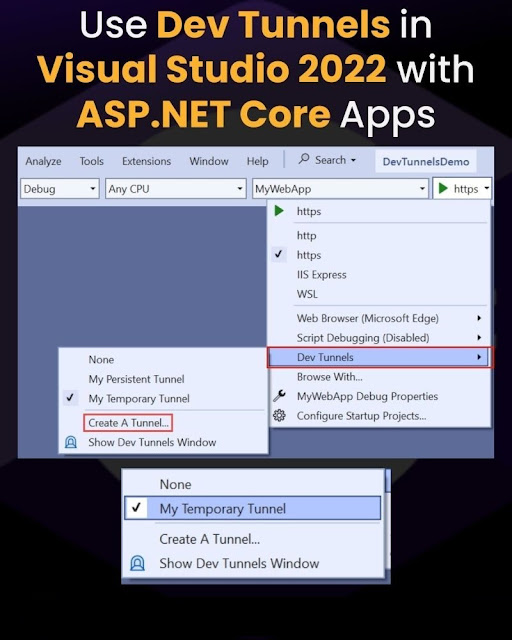
💡 𝗩𝗶𝘀𝘂𝗮𝗹 𝗦𝘁𝘂𝗱𝗶𝗼 𝐓𝐢𝐩 - 𝗨𝘀𝗲 𝗗𝗲𝘃 𝗧𝘂𝗻𝗻𝗲𝗹𝘀 𝗶𝗻 𝗩𝗶𝘀𝘂𝗮𝗹 𝗦𝘁𝘂𝗱𝗶𝗼 𝟮𝟬𝟮𝟮 𝘄𝗶𝘁𝗵 𝗔𝗦𝗣.𝗡𝗘𝗧 𝗖𝗼𝗿𝗲 𝗔𝗽𝗽𝘀 𝗗𝗲𝘃 𝗧𝘂𝗻𝗻𝗲𝗹𝘀 allows developers to securely expose localhost URLs over the internet by creating temporary, publicly accessible URLs. 𝗗𝗲𝘃 𝗧𝘂𝗻𝗻𝗲𝗹𝘀 enable you to access your local development environment from the internet and allow secure share with colleagues through an encrypted channel. 𝗗𝗲𝘃 𝘁𝘂𝗻𝗻𝗲𝗹𝘀 also offer authentication and access control features for added security when sharing your local services. ℹ️ 𝗗𝗲𝘃 𝗧𝘂𝗻𝗻𝗲𝗹𝘀 feature was officially released with 𝗩𝗶𝘀𝘂𝗮𝗹 𝗦𝘁𝘂𝗱𝗶𝗼 𝟮𝟬𝟮𝟮 𝘃𝟭𝟳.𝟲 for windows. 🔥Here are the advantages of using 𝗗𝗲𝘃 𝗧𝘂𝗻𝗻𝗲𝗹𝘀, ✅ 𝗦𝗲𝗰𝘂𝗿𝗲 𝗯𝘆 𝗱𝗲𝗳𝗮𝘂𝗹𝘁 - By default 𝗗𝗲𝘃 𝗧𝘂𝗻𝗻𝗲𝗹𝘀 you create are only accessible to you through your Microsoft, Microsoft Entra ID, or GitHub account . ✅ 𝗣𝗲𝗿𝘀𝗶𝘀𝘁𝗲𝗻𝘁 𝗨𝗥𝗟𝘀 - Maintain the same 𝗗𝗲...
